Author name: Barry Starling

About Me

“You don’t talk to enough people”

Yep, that’s me! And this is what both of my business coaches tell me. Not just once, but many times! My job is to create software for small businesses, so I spend most of my day staring at a screen. This is what I have done since I first started programming in the early 80’s, and it is where I feel comfortable.

I have to force myself to meet, and talk to people! Listening to other business owners, I am not on my own. I am a member of Newark, Grantham and Lincoln’s business club. I was a BNI & 4Networking member for many years and I also attend other networking events.

The key word here is attend! I am present, but not making the most of the event! I talk to familiar faces before the meeting, I talk to the people round my table, at the break I hide, and then I leave! Once the meeting is over, I don’t interact with the new people I’ve met or even the people I’ve known for years! I know. You know. And both my coaches know, that this is not how to network, build a business, or find new opportunities!

One of my goals for 2026 is to change this, and I am going to use Candid CRM to help me. Each networking event I am going to find 3 people (minimum) and:

  • Get their contact details (scan business card)
  • Create an action for the same day to email them to ask for one2one.
  • Complete the action that same day.

This is a big change for me. The one2ones are not to sell bespoke software systems to these people. It is to share problems, ideas, and solutions, and to look for opportunities. Opportunities not just for me, but for them and other people I have met eg. referrals.

First networking meeting is on Friday, Newark Business Club, lets see how I get on.
Development

This is why you have beta-testers!

James MacArthur is always my first beta-tester. He is a web designer and owns The Web 4 Less in Clevedon. James has been a business partner but is also my friend. An honest friend that tells me how it is. That is what I need from a beta-tester.

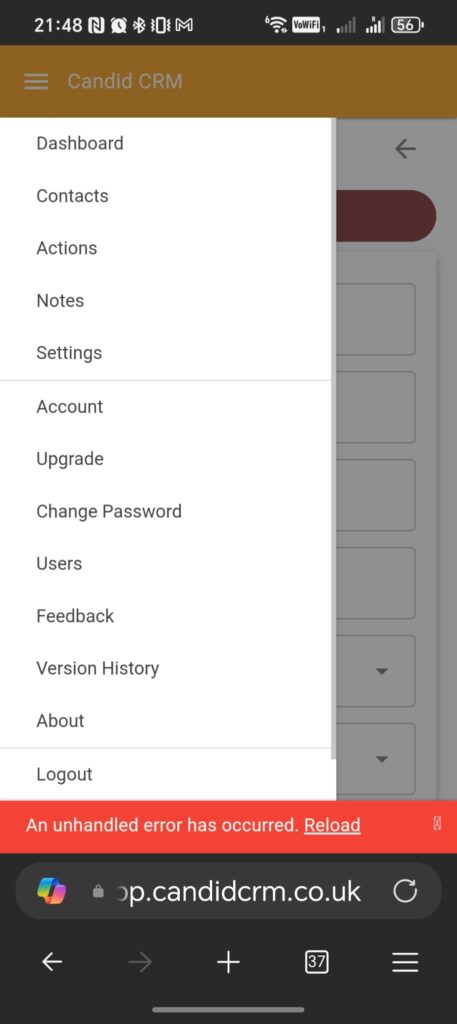
He signed up, went to add his first contact and got the error shown. This is an “Unhandled Exception” error, which basically means, something has happened that I did not code for!

Am I upset, yes, not because James found it, but I did not find it first. I am pleased James found it, better him than a paying user.

So what happened and why did I miss this? When you build an app, you start with no data. You write the code to add data to the database. However, when a new user signs up, there is no data, and since creating the code, additional functionality, database fields and new logic has been added.

I missed this because I have a routine that clears out my user, deletes contacts, actions, note etc. What it did not delete was “contact types” (Lead, Customer, etc) because I did not want to set them up again. When James signed up, these contact types should have been automatically created, but a bug prevented this!

Releasing a new product is an event that happens one or two times a year. However, this is something I should know and should have tested!

James is now up and running, and the embarrassment I felt has diminished. I have added two more beta-testers today. Lets see what they report.

Tools

App Subscription Payments

Years ago, taking payments for subscriptions was hard. To be able to take credit/debit cards you would have become a merchant. Later came PayPal which allowed for a button to be put on your website, this was a good solution and it worked. Back then, apps were sold as a one-off payment, the same way you would buy video games from a shop back in the 80s/90s.

Today, apps are sold with a regular subscription. This helps spread the cost of the app for the user, but more importantly, it helps developers. Developing an app takes months, even years. The subscriptions give the developer a regular income. This enables a better support for the app being subscribed to but also, income while developing add-ons and new apps.

Stripe made taking payments and managing subscriptions easy. I am sure there are other solutions, but Stripe works for me. They pay me monthly, but this can be more regular and the dashboard tells me exactly where I am. Being able to predict next months income is reassuring, my focus should be on creating useful and reliable apps, not worrying about how I am going to pay my rent!

Being a small developer, being able to offer discount codes helps with sales. They are a very good way of getting new users to try the app. I always have a 30-day free trial, but if the users know they are getting a 30%, 50% or even 70% discount when they subscribe, they are more eager to try the app. Remember, the discount is only for the first year.

Integrating Stripe into your app is as simple as opening a webpage from a link or button. Stripe then takes care of the payment. Once successful, you can tell Stripe to come back to your app, which page, and with parameters so you can update the database with payment details. Simple!

I cannot recommend Stripe enough, give it a go. I do not get a commission or bonus for recommending Stripe, it works, that’s why you should use it.

Development

Functional Coding Complete!

A big day today, I finished all the coding that makes Candid CRM usable. This does not mean that Candid CRM is finished, it just means that I can use it as well as my beta-test team. The version I sent live today is the first version that does not have the pre-release warning. This means that the data that is entered by the users is safe, a big step!

Remaining development tasks generally revolve around the dashboard. Charts showing statistics regarding contacts, their status, and the products they are interested in. Other information such as last communication and last viewed date will also be used to encourage the user to keep making contact with their potential customers.

The only other, rather urgent, development task, is the background job that will send emails to users telling them what actions they have for the day as well as birthdays and a list of “neglected” contacts, maybe some some states to help motivate the users, such as actions completed in the last year/month etc. The background job already exists, it handles password resets, welcomes new users and monitors database usage (we don’t want to run out of space!).

There are still a lot of non-coding jobs to do. Setting up Stripe to accept payments, complete with voucher codes to help promote the app.

There is still the privacy policy, terms of service, and the website to update. AI will be assisting here. I have templates that I have used in the past, but letting AI read and update the documents makes sure I am protected. Plus, cheaper than solicitors in this early stage.

My first beta-tester is my 29 year old son. He is starting a security company installing alarms and CCTV later in the year. Let’s see if he can sign up and create his first contact!

Candid CRM In Action

Day 1 Preparation

Candid CRM is not finished yet, today I have made sure the settings screen looks good on both mobile and desktop.

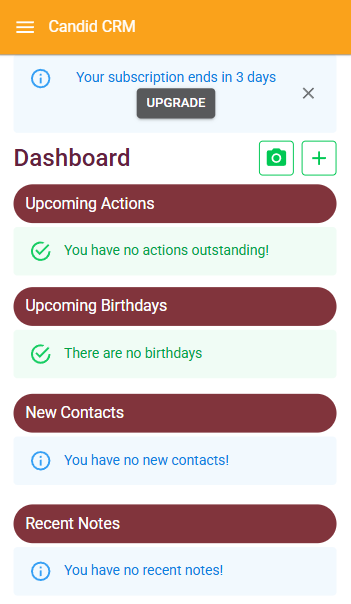
This morning I removed all the test data from my account, this left me with no contacts which has not happened since before I started on the dashboard. This gave me blank “Upcoming Actions” and “Upcoming Birthdays”, which is OK, but better to let the user know. It was also blank where “New Contacts” and “Recent Notes” should be. I’ve added a message to explain this.

My Candid CRM is now ready to add contacts, but before I do this, I headed to the Settings screen.

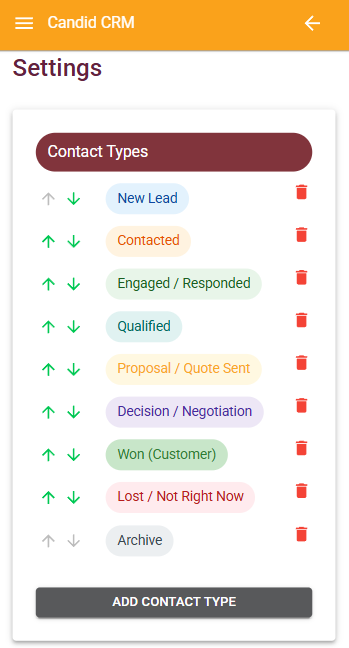
Contact Types

I am going to start with the default contact types. They fit my bespoke software business and that is the customer I want to find. For my apps, there are too many stages, but I can skip for the time being.

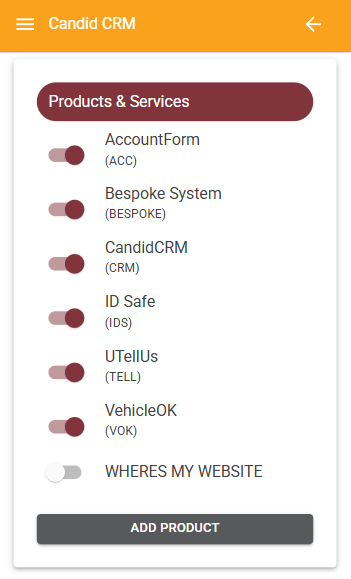
Products & Services

I have added my main products and services as of today. I can see this expanding but for now this is a good start. Where’s My Website is an old product that I have discontinued. I have disabled it but may enable it if people need to know if their website is up and running.

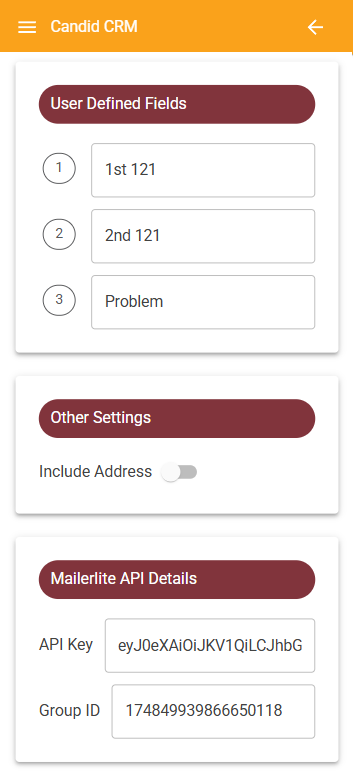
User Defined Fields & Address

I am not sure what I want to use the user defined fields for. I want to make sure that I have had a one-to-one with my contacts but not sure about a second one-to-one. I definitely want to know what their biggest business problems are. This I will come back to.

I never wanted to include address in Candid CRM. But, it is vital for some businesses. Here you can switch it on if you need it.

MailerLite API Details

I have used MailerLite for a year. It is easy to use and to add automations. By providing an API key and a Group ID, any new contact added will be added to that group. I am thinking of adding an automation to send a welcoming email. Tell the person a little about myself and Mustard Software. Finally, a button for the customer to book a one-to-one using something like Calendly. All of this is to make it as easy as possible to get time with the people I am adding to Candid CRM.

Ready to go!

Monday 5th January 2026 is the date most people will be back at work. Those in today are likely to be preparing for the New Year, I know I am!

Monday will also be the day I start adding peoples details to Candid CRM. I am looking forward to using the “Scan Business Card” function as well as adding some of my existing leads and customers, people I have not spoken to for a long time.

CRM

Contact Types for your business

In sales, the following contact types are used:

  • New Lead
  • Contacted
  • Engaged
  • Qualified
  • Proposal Sent
  • Decision
  • Won
  • Lost

These are what I have used as defaults in Candid CRM. But it is unlikely that your business follows this process. So, today I have spent the day making sure that you can changes these types as well as add your own. I have also given you the ability to change the order.

There is one more contact type that I have added. This one you cannot delete and will always be the last one. That type is:

  • Archive

Archive, is the nicest word I could think of! This type of contact are for the people you never want to deal with. They are bad for your business. However, they need to be in your CRM so that you know not to deal with them. More importantly, everyone in your business knows not to deal with them.

You can list all your “Archived” contacts, but they will be ignored everywhere in the CRM, including dashboard and reports. Before you archive a contact, you should add a note or better still, update the comment for that contact. This will remind you and your team that they should not communicate with them.

CRM

Birthday, not Date of Birth

Candid CRM was designed to be easy to use, with no clutter. There was no plan for a date of birth field. Firstly, I could not see the point, secondly, I rarely know the year of birth, and thirdly, entering the day, month and year is time-consuming. However, the point of a CRM is to keep in touch with your contacts. What better way to keep in touch than to email, telephone or visit a contact to wish them a happy birthday!

So, today, I added a day and month for birthday. The day is a one or two digit number and the month is a dropdown. This makes entering birthday days quick and simple. The dashboard now shows contacts with birthdays in the next 7 days, this may change to 10 or 14 later on, or be a setting. Birthdays are listed after actions, actions are the most important thing in my mind for a CRM, but once those are complete, you should work your way through the contacts with birthdays. You never know where the conversation will lead, maybe to a new opportunity or sale.

Tools

Candid CRM Planning

Creating an app is very time-consuming. You have to decide which features are required at launch and what can wait till later. As you develop the app you think of new features or ways that you could do an existing feature better. I used to use a spreadsheet and have columns for each stage, and then I discovered Trello. I used the free version for a short while, but when I realised that I could use it for all of my customers as well as all my projects, I subscribed.

Trello is a Kanban style project management system whereby you add tasks (cards) to lists. You can mark the task as complete and you can move the task to a different list. I like Trello because it can work how I want to work. I Have different stages for customers (Urgent, To Do, In Progress, Show Customer & Complete) and for myself (Next, Pre-Launch, Complete, Marketing). Each project varies, but that is why I like Trello as it works for me.

The video below shows the final stages before the launch of Candid CRM. There is a lot to do and quite a lot more once launched.

I recommend having a column for completed tasks. Clicking the tick is nice, but to see how much you have done, especially when you are having a bad day, is a real motivator.

Give Trello a go! https://trello.com I am not a referral partner and will not benefit from you trying Trello, other than it will help you in your business. Did I mention that you can share boards? I use this with customers, hence why I have a list for “In Progress”, so the customer knows what I am doing. “Show Customer” is a list that I go through with the customer when we next meet.

About Me

2026 Challenge

I’m sat on the bed with my wife in a Brighton hotel room, sipping fresh takeaway coffee before heading out for a family breakfast. This blog was supposed to be started boxing day, but I was unsure where to start. I am also daunted by the challenge of consistently writing every day!

Each year I set a goal, last year was to create a framework that enabled me to create apps very quickly. I thought I could enable small businesses to have apps to help them for a very low fee. The problem I didn’t see was that business owners don’t know that an app could solve a problem they have. I can see instantly where an app could help in day to day processes, but none app people cannot. Lesson learnt!

This year I am going to do something quite alien to me! I am going to use one of my own apps daily. You may think this is obvious, but I create apps for other people, other businesses, once complete, I hardly look at them again.

The app I have decided to use is Candid CRM which I began writing in October 2025. Most of my big customers have a CRM, either an off-the-shelf, or one that I have created for them.

So my challenge for 2026 is to use my CRM every day to meet people and find opportunities. Those opportunities could be for my software business, a new business or a joint venture. I will use this blog to document my progress, problems, solutions and the tools that help me along the way

Scroll to Top